Delivery and operations · Signature generation and safe delivery
A signature tool succeeds when the pasted email keeps its format
Source-reviewed technical draft. Diagrams and walkthroughs use abstract or invented inputs. Implementation, reported use and measured outcomes remain separate.
I built a signature-generation workflow, then improved the part that determines whether it is useful: copying formatted output into an email client. A correct preview in a browser does not prove that Gmail or Outlook will preserve the same structure after paste.
My contribution history shows the interface evolving around that final action.
Start with a constrained HTML output
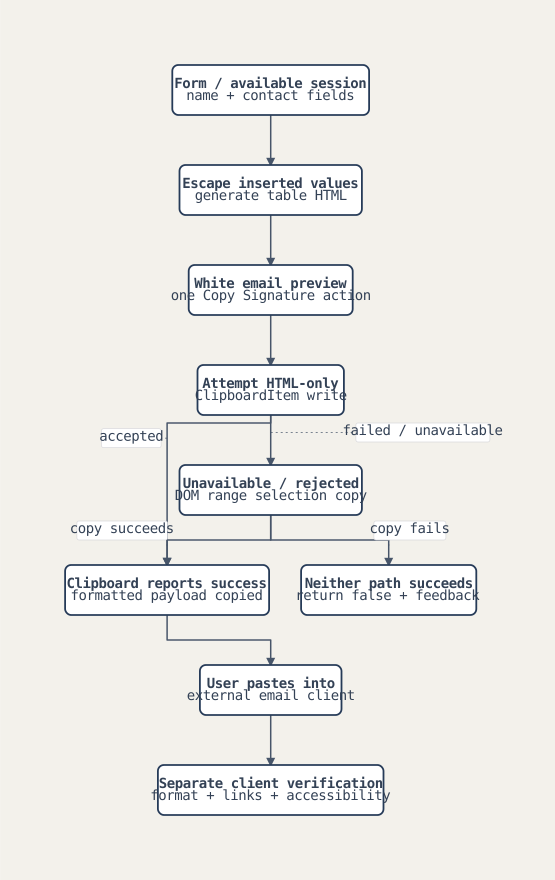
The authored change added the generator, session-assisted name and email fields, preview, setup guides and application registration. The HTML generator uses a table layout with inline styles and email-specific formatting rules. Optional title, phone and disclaimer sections are assembled from form values; phone numbers receive a defined normalization rule.
The output format is deliberate.
I used escaping for inserted text and attributes. That protects formatting from special characters, but escaping alone does not establish a complete URL-scheme validation policy or compatibility across every email client. The source tests exercise formatting and escaping. They are historical authored tests, not a fresh browser-to-email compatibility matrix from this study.
Preserve the rich format through clipboard fallback
The initial implementation wrote HTML and plain text together. The authored change changed the primary copy path to a ClipboardItem containing HTML only. If the modern clipboard write is unavailable or fails, the helper selects the rendered preview with a DOM range and tries the browser's copy command. It can create a temporary offscreen container when no preview target is supplied.
I made rich copy a distinct operation.
The helper returns false when it cannot complete either path. It does not report a plain-text fallback as successful rich copying. A separate utility can copy raw text, but later interface work removed that secondary action from the preview. Browser permission and clipboard behavior remain external constraints.
Inspect the system diagram
The same PR added a standalone public route and a Relay Content entry, with the component able to render without a blocking authenticated-user loading screen. That supports a route for people who are not yet onboarded to Atlas. The source change is not a count of people who used it or proof that a hosted production route is currently available.
The shared component contract caused an operator failure
The authored change fixed buttons that were passed as Tooltip children even though the shared component expected a trigger prop. The action ended up inside the popover rather than being directly available as intended. The fix rendered visible actions and gave the primary copy button a clear label and defined color classes.
That is the kind of integration detail a generic component mockup misses.
I later simplified the preview in the authored change: a standard white email canvas, one full-width Copy Signature action, and removal of theme toggles and the raw HTML copy action. The PR also restored the signature tab in the renamed HTML Hosting surface after it had been dropped during another change.
These are different revisions of one workflow. I do not present the earlier theme controls and removed copy action as current features while describing the later simplified interface.
Invented onboarding walkthrough
- Enter fictional employee Sam Rivera with a title, example-domain email and optional phone number.
- Review the generated table on the white email canvas. Toggle optional content through the form rather than changing preview themes.
- Copy through the modern HTML clipboard path. Reconstruct denied permission and show the DOM-selection fallback.
- Show a failed-copy result without claiming that formatted paste succeeded.
- Explain the separate validation still needed: paste into representative email clients, inspect formatting, and check links and accessible text.
No real employee record, provider operation or measured compatibility result appears in this walkthrough.
Results and contribution scope
My authored changes support an implemented generator, rich-copy recovery, public and embedded routes, a shared-component repair and a later simplification. They do not establish universal email-client fidelity or deployment adoption. I would use this study to show attention to the operator's complete task, including the handoff from the application into another tool.
Discussion notes
Three-minute outline. describe the copy-and-paste task; show table generation; explain HTML-only clipboard and DOM fallback; finish with the component-contract fix and simplified final action.
Questions to prepare. What does a successful clipboard write prove? Which email clients would you test first? How would you validate URLs separately from escaping? How can shared component misuse hide a critical action?
Application summary. I built a signature workflow and followed it through the handoff into email clients: constrained HTML generation, clipboard fallback, public access and UI repairs. I can distinguish source correctness from actual paste compatibility and explain what testing remains. That reflects the attention to existing customer tools that a deployed workflow needs.
This contribution narrative is supported by privately held source and authorship records. It contains original explanations and abstract diagrams, without employer code, customer records or runtime telemetry. Missing outcome evidence stays explicit.